
FireWire has long been a trusted interface for high-speed data transfer, especially in multimedia applications. Despite its age, FireWire remains relevant in specific niches thanks to its reliable, real-time capabilities. For Linux users and developers aiming to get the most out of FireWire hardware, understanding the underlying communication mechanisms is key. This guide walks you through the essentials of FireWire hardware communication on Linux, covering driver architecture, data transfer protocols, and practical setup steps.
FireWire communication on Linux hinges on specialized drivers, hardware protocols, and system support. Understanding these components helps troubleshoot issues and optimize data transfer, making FireWire a powerful tool for multimedia and real-time data applications.
How FireWire hardware communicates with Linux systems
FireWire, known technically as IEEE 1394, relies on a set of protocols and driver frameworks that enable hardware devices like cameras, external drives, and audio interfaces to connect seamlessly with Linux. Unlike USB, which is more consumer-focused, FireWire offers deterministic data transfer, making it ideal for high-bandwidth, latency-sensitive tasks.
At its core, FireWire communication involves a mix of hardware signaling, protocol stacks, and kernel drivers. Linux’s support for FireWire is mainly managed through the ieee1394 subsystem, which abstracts the hardware interactions and provides a standardized interface for user-space applications.
The role of Linux drivers in FireWire communication
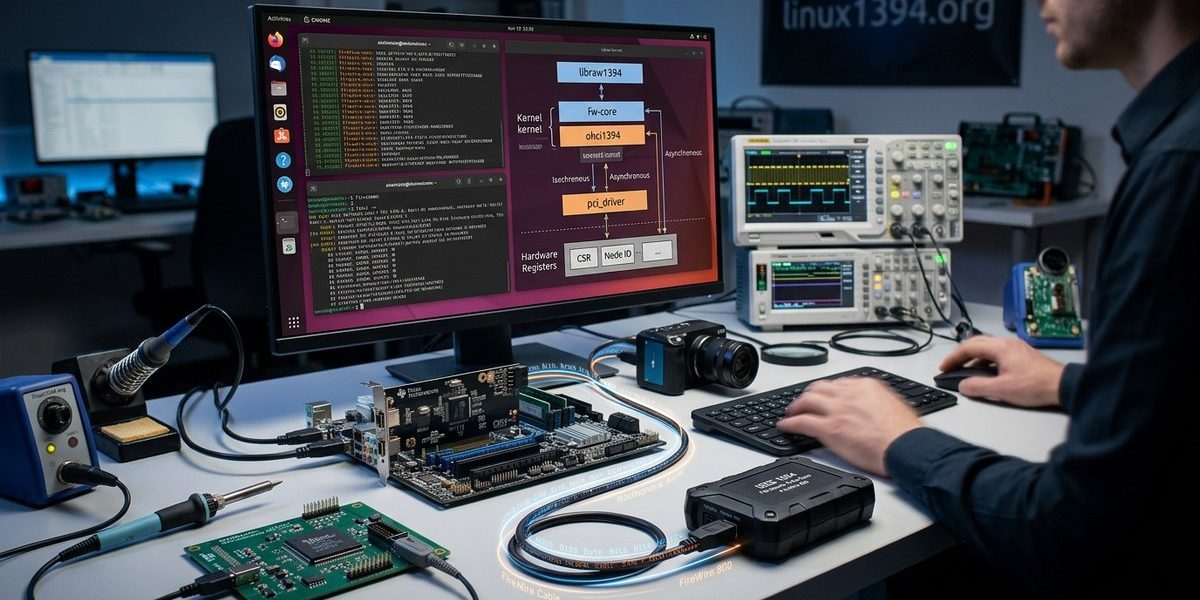
Linux’s FireWire support is built around the ieee1394 subsystem, which includes core drivers, device-specific modules, and user-space interfaces. The main driver component is the firewire-ohci driver, responsible for the OHCI (Open Host Controller Interface) hardware controllers. This driver manages the physical link layer, handling the signaling and link management required for FireWire communication.
For data transfer, the firewire-core module orchestrates transactions between hardware and user-space. It handles configuration, bus management, and transaction layer protocols. User-space tools like libraw1394 and libfreenect interact with these kernel modules to facilitate device control and data streaming.
Protocol layers in FireWire communication
FireWire’s architecture is structured into several layers:
- Physical Layer: Handles actual electrical signaling over cables, managed by the hardware controller and the firewire-ohci driver.
- Link Layer: Manages node connection, bus arbitration, and reset procedures.
- Transaction Layer: Facilitates data transfer requests, responses, and error handling.
- Data Protocols: Include isochronous (real-time data streams, such as video) and asynchronous (standard data transfer) modes.
Understanding these layers helps troubleshoot hardware issues and optimize data throughput.
How hardware devices communicate
In practice, FireWire devices communicate through a combination of hardware signaling and software protocols. When a device connects, the bus manager (handled by the Linux driver) detects and configures the device. For example, a FireWire camera will register as a node on the bus, and the kernel sets up data channels for streaming.
Data transfer in isochronous mode is particularly sensitive. It guarantees bandwidth and low latency, which is critical for video and audio. The Linux driver manages this by reserving bus bandwidth and scheduling streams efficiently.
Practical steps to set up FireWire hardware on Linux
Getting your FireWire device up and running involves several steps:
- Check hardware compatibility. Ensure your controller is supported by the firewire-ohci driver. Most PCI-based FireWire controllers are supported, but older or specialized hardware may need additional modules or patches.
- Load the necessary modules. Use commands like
lsmodto verify if firewire-ohci and firewire-core are active. If not, load them withmodprobe. - Connect your device. Once physically connected, Linux should automatically detect the device and assign it a device node, typically under
/dev/like/dev/raw1394. - Install user-space tools. Utilities like libraw1394 provide interfaces for device management and data streaming.
- Test communication. Use commands such as
dvgrabfor video devices orraw1394for direct bus management to verify operation.
Troubleshooting common issues
| Technique or mistake | Explanation | How to fix or avoid |
|---|---|---|
| Missing driver modules | Hardware isn’t recognized | Load modules with modprobe firewire-ohci and modprobe firewire-core |
| Device not detected | Connection issues or bus errors | Check cable quality, ensure device is powered, verify bus arbitration |
| Permission problems | Access denied to /dev/raw1394 |
Add user to the video or dialout groups and set correct permissions |
| Unsupported hardware | Controller not compatible | Consult Linux hardware compatibility lists or try alternative controllers |
For optimal performance, use high-quality cables and test your hardware on a known-good port. Keep your Linux kernel updated for the latest FireWire support improvements.
Tips for optimizing FireWire data transfer on Linux
- Use dedicated FireWire controllers rather than shared PCIe or USB interfaces.
- Reserve bandwidth for isochronous streams when using multimedia devices.
- Regularly update your Linux kernel to benefit from driver enhancements.
- Enable debug logs for the firewire subsystem to diagnose issues.
Practical guide to working with FireWire on Linux
- Verify hardware support. Confirm your controller is supported by checking the Linux kernel documentation or community forums.
- Prepare your system. Load the necessary modules, and ensure your user has permission to access
/dev/raw1394. - Connect your device. Turn on the device and connect it securely to the FireWire port.
- Test the connection. Use tools like dvgrab or libraw1394 to scan and stream data.
- Troubleshoot issues. Review kernel logs with
dmesgfor errors and adjust hardware or configurations accordingly. - Optimize performance. Adjust bus configurations for isochronous bandwidth and explore kernel parameter tuning for better stability.
Why FireWire remains a vital part of Linux hardware communication
FireWire’s real-time data transfer capabilities and robust protocol stack make it a lasting option for specialized applications. Linux’s support through dedicated drivers and user-space tools enables enthusiasts and developers to harness its full potential. Whether capturing high-definition video or managing external storage, understanding the low-level communication helps troubleshoot issues and improve performance. Staying updated on driver developments and hardware compatibility ensures FireWire continues to serve niche needs effectively.
Getting familiar with the Linux FireWire stack empowers you to troubleshoot hardware, optimize data transfer, and expand your multimedia projects. With a solid grasp of the underlying protocols and system setup, you can make the most of FireWire’s unique strengths.
Applying your FireWire knowledge for better hardware integration
Practicing these setup procedures and understanding the communication layers will help you resolve issues quickly. Whether you’re connecting a professional video camera or an external audio interface, knowing how Linux manages FireWire communication ensures smoother operation. Keep your system updated, and experiment with different configurations to find what works best for your hardware setup. FireWire remains a reliable choice for high-performance data transfer when configured correctly on Linux systems.